

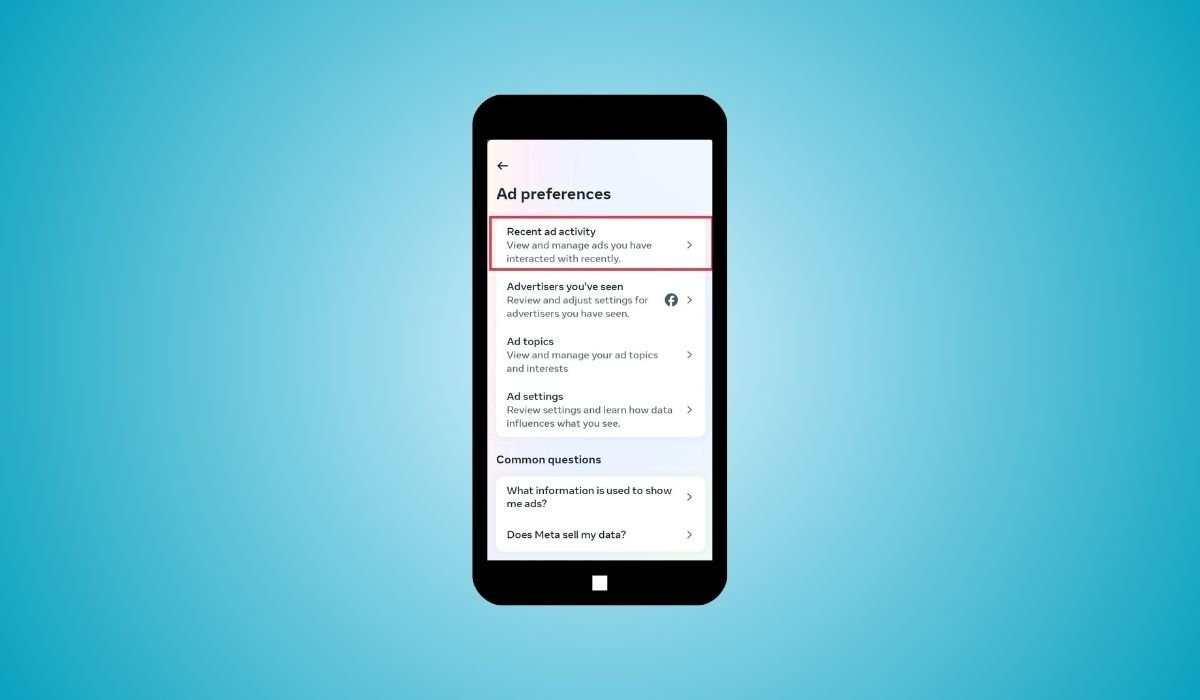
Deleting recent ad activity on Facebook Android is a simple yet effective way to take control of your privacy. Facebook tracks your interactions with ads, which helps it target more relevant ads in the future. However, not everyone is comfortable with this level of tracking.
Clearing recent ad activity is crucial for those who want to keep their browsing habits private. It’s also useful for people who want a more customized experience or to avoid seeing similar ads repeatedly.
By managing your ad activity, you regain control over what data is stored and used to personalize your experience on the platform.
Key Takeaways
- Deleting recent ad activity helps maintain your privacy and limits Facebook’s ability to show targeted ads based on past interactions.
- Facebook doesn’t offer a bulk delete option for recent ad activity, but you can manage and clear individual interactions.
- Your ads may become less personalized after deleting ad activity, though Facebook will still display ads based on other factors.
- Regularly managing your ad settings allows for more control over the ads you see and enhances your overall Facebook experience.
What is Facebook’s Recent Ad Activity?
Recent ad activity on Facebook refers to the history of ads you’ve interacted with, such as ads you’ve clicked on, liked, or engaged with in some way. This data is stored to help Facebook tailor future ads to your preferences.
Facebook tracks these interactions by monitoring every ad engagement. Whether you click on an ad, comment, or even just view it for a longer period, Facebook collects that data.
This information is then used to show you ads that align with your interests. If you frequently engage with certain types of ads, you’ll likely see more similar ads in the future.
Why You Might Want to Delete Recent Ad Activity
Here are a few reasons you might want to delete recent ad activity:
- Privacy concerns: To prevent Facebook from tracking your ad interactions.
- Ad relevance: To avoid seeing ads based on past engagements.
- Reduce clutter: Clear out old or unwanted ad history.
- Control your experience: Customize the ads you see moving forward.
Step-by-Step Guide: How to Delete Recent Ad Activity on Facebook Android
- Open the Facebook app on your Android device.
- Navigate to the Menu (three horizontal lines) at the top-right corner.
- Scroll down and select Settings & Privacy.
- Tap on Settings.
- Scroll to the Ads section and tap on Ad Preferences.
- Select Recent Ad Activity to view all recent ad interactions.
- Choose the specific ad interaction you wish to delete.
- Tap the Remove or Clear option to delete the interaction.
Can You Delete All Recent Ad Activity at Once?
Facebook does not currently offer a bulk deletion feature specifically for recent ad activity. Deleting ad activity manually must be done on an individual basis. However, this does not significantly impact other aspects of the Facebook user experience, such as your newsfeed or interactions.
To delete all recent activity at once:
- Open Facebook and tap the three horizontal lines (menu) at the top right.
- Select the gear icon to open Settings.
- Scroll to “Your Activity” and tap “Activity Log.”
- Find and select “Clear Previous Activity.”
- Follow the prompts to confirm the deletion.
This clears all previous ad interactions in one go.
What Happens After Deleting Recent Ad Activity?
After deleting recent ad activity, Facebook will no longer use those specific interactions to personalize the ads you see. However, deleting this activity doesn’t stop Facebook from collecting data in the future or from showing you ads based on other information, such as your general activity on the platform.
Your ad experience may become less tailored, but you’ll still see ads. The ads may be less relevant since Facebook won’t have your recent interactions to guide its targeting.
Other Privacy Tips for Facebook Ads on Android
Here are additional privacy tips for managing Facebook ads on Android:
- Adjust Ad Preferences: Go to Settings > Ads > Ad Preferences and modify your interests to control what types of ads you see.
- Turn off Ad Personalization: Disable personalized ads by going to Ad Settings and turning off ads based on your activity off Facebook.
- Manage Off-Facebook Activity: In Settings, access Off-Facebook Activity to view and manage data collected from other apps and websites.
- Limit Ad Data Sharing: Choose not to share your activity data with advertisers by adjusting your privacy settings.
- Clear Search History: Regularly delete your search history to prevent it from influencing the ads you see.
Conclusion
Deleting recent ad activity on Facebook Android gives you more control over your privacy and the ads you see. It helps reduce targeted ads, keeps your browsing habits private, and offers a cleaner, more personalized experience.
By regularly managing your ad settings, you can enjoy a more tailored and controlled Facebook experience. Take the time to review and adjust your ad preferences to keep your data and privacy in check.
FAQs
Can I delete all my recent ad activity at once on Facebook?
No, Facebook doesn’t offer a bulk delete option specifically for ad activity, but you can manually delete each interaction or clear all activity via the Activity Log.
Will deleting recent ad activity stop Facebook from showing ads?
No, you will still see ads on Facebook. However, they may be less personalized since Facebook won’t use your recent interactions for targeting.
Does deleting recent ad activity impact other Facebook features?
No, deleting ad activity only affects the ads you see. It won’t impact other features like your newsfeed or interactions with friends.
Can I stop Facebook from tracking my ad interactions?
You can manage ad preferences and limit data collection by adjusting settings like Off-Facebook Activity, but some data collection for ads will continue.
How often should I clear my recent ad activity?
It’s a personal choice, but regularly clearing your ad activity can help maintain better privacy and control over the ads you see.
Does clearing ad activity affect my overall Facebook experience?
Not significantly. Your experience with ads may become less personalized, but the rest of your Facebook usage will remain unchanged.
Can I turn off ads completely on Facebook?
No, Facebook doesn’t allow users to completely turn off ads. You can only limit how ads are personalized by managing your settings.


