

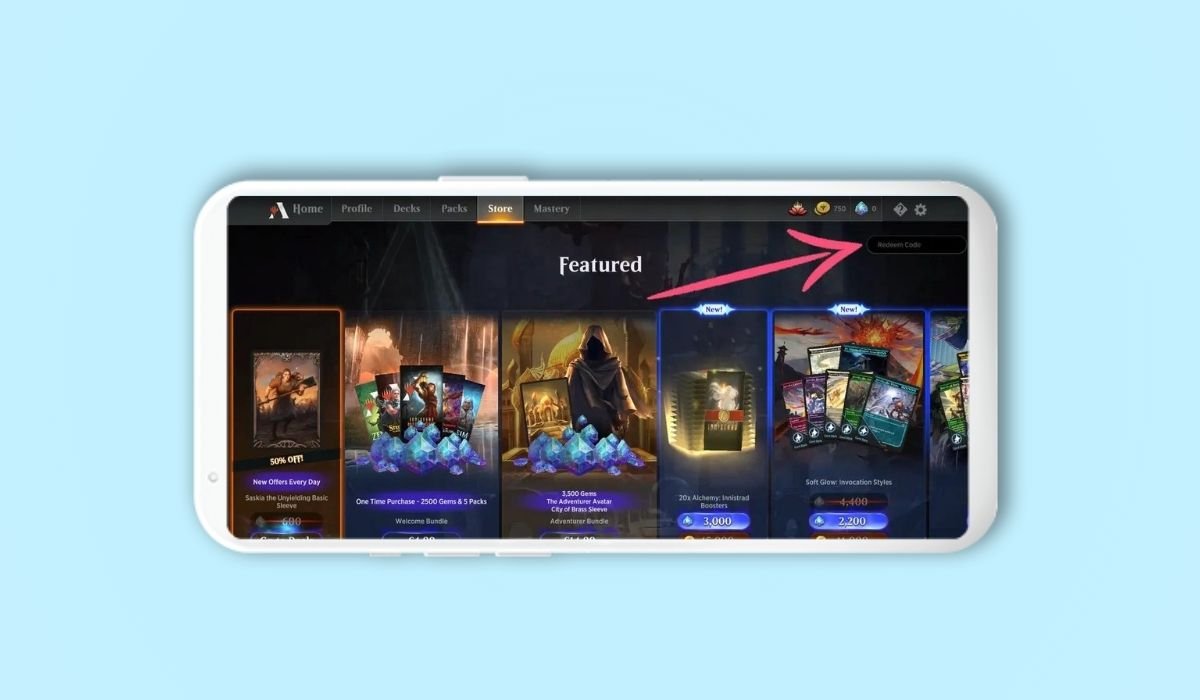
Redeeming MTG Arena codes on Android is simple. Visit myaccounts.wizards.com, sign in, enter the code in the “Redeem A Code” box, and click “Redeem.” Then, open the MTG Arena app on your Android device and check the Store tab for your rewards.
Magic The Gathering Arena (MTG Arena) offers players the exciting opportunity to redeem codes for free in-game rewards. To redeem a code, visit myaccounts.wizards.com and sign in. Find the “Redeem A Code” section, enter your code in the text box, and click “Redeem.” Upon successful entry, you’ll see a confirmation message. To claim your rewards, open the MTG Arena app on your Android device and navigate to the Store tab. This simple process ensures you don’t miss out on valuable content to enhance your digital card game experience.
Key Takeaways
- MTG Arena codes can be redeemed through the Wizards of the Coast website
- You need a Wizards Account linked to your MTG Arena account
- Codes can provide various rewards like booster packs, card styles, and more
- Some codes have expiration dates or limited uses
- Regularly check for new codes to maximize your rewards
Understanding MTG Arena Codes
What Are MTG Arena Codes?
MTG Arena codes are special combinations of letters and numbers that players can redeem for various in-game rewards. These rewards can include:
- Booster packs
- Individual cards
- Card styles
- Sleeves
- Avatars
- Experience points
- In-game currency
Where to Find MTG Arena Codes
Codes can be found from various sources:
- Official MTG Arena promotions
- Physical Magic: The Gathering products
- Special events and tournaments
- Community giveaways and partnerships
It’s important to stay updated with the latest MTG Arena news and community discussions to find new codes as they become available.
Also read: How to Connect Anycast to Your Android Device: A Simple Guide
Preparing to Redeem Codes
Before you start redeeming codes, ensure you have the following:
- An active MTG Arena account
- A Wizards Account linked to your MTG Arena account
- Access to a web browser (mobile or desktop)
How to Redeem MTG Arena Codes on Android
Redeem on Desktop
If you have access to a computer, you can log in to the desktop version of MTG Arena and redeem your codes following these steps:
- Launch MTG Arena on your PC or Mac.
- Go to the Store page (usually located on the top menu bar).
- In the top right corner, you’ll see a button or area saying “Redeem Code”. Click on it.
- Enter your code and hit “Enter”.
Redeem on Wizards Account Website
- Go to the Wizards account website
- Log in to your account that’s linked to MTG Arena.
- Click on “Redeem a Code” (usually found on the right side of the page).
- Enter your code and click “Redeem”.
Also read: Creating Stop Motion Videos on Android: A Step-by-Step Guide
Troubleshooting Common Issues
- Check code validity and expiration date
- Verify code is entered correctly without typos
- Ensure code is intended for your region
- Restart MTG Arena app if rewards don’t appear
- Update app to latest version
- Confirm Wizards Account is properly linked
- Clear cache and data of MTG Arena app
- Contact support if persistent issues occur
Tips for Managing and Finding Codes
- Create a spreadsheet to track redeemed codes
- Set reminders for time-sensitive promotional codes
- Follow official MTG Arena social media accounts
- Join MTG Arena Discord servers and forums
- Check gaming news sites for code announcements
- Subscribe to MTG Arena newsletters
- Participate in community events for exclusive codes
- Use code-tracking mobile apps or browser extensions
Also read: Where to Find Your Scanned Documents on Android


