

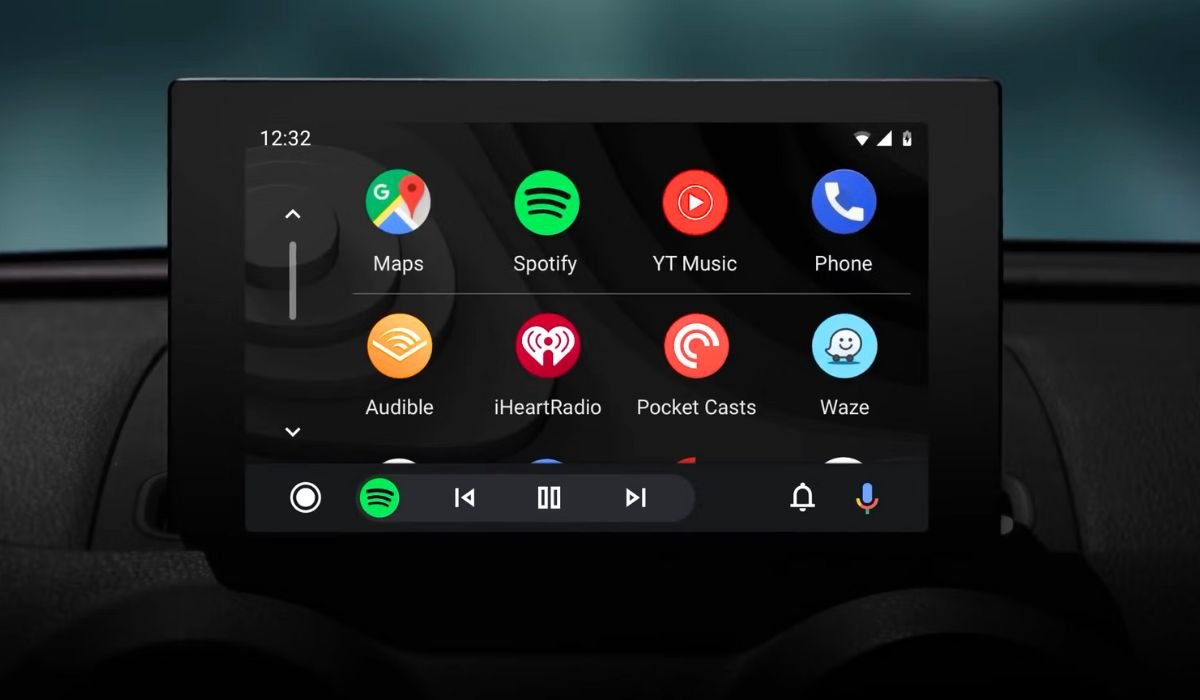
Android Auto transforms your car’s infotainment system into a smart, connected hub, bringing your smartphone’s power to your dashboard. It offers a safer, more convenient way to access your favorite apps while driving, enhancing your in-car experience.
With Android Auto, you can make calls using voice commands and answer incoming calls with a simple tap. It supports a wide range of media apps, including Spotify, Amazon Music, Pandora, and Audible, allowing you to enjoy music, radio, news, sports updates, audiobooks, and podcasts effortlessly during your journey.
Key Takeaways
- Android Auto supports various app categories including navigation, music, messaging, and podcasts
- Popular apps like Google Maps, Spotify, and WhatsApp are fully compatible
- Voice commands enable hands-free operation for safer driving
- Regular updates introduce new features and app support
- Setting up Android Auto is straightforward and user-friendly
Understanding Android Auto
Android Auto is a mobile app developed by Google that allows users to mirror their Android device’s interface to a car’s compatible in-dash information and entertainment head unit. It provides a simplified interface with larger buttons and voice control capabilities, making it easier and safer to use apps while driving.
Categories of Apps Compatible with Android Auto
Navigation Apps
Google Maps
Google Maps remains the go-to navigation app for many Android Auto users. Its 2024 update brings enhanced real-time traffic data and more accurate ETAs. The app now offers:
- Improved lane guidance
- Better integration with electric vehicle charging stations
- More detailed voice instructions for complex intersections
Waze
Waze, known for its community-driven approach, has introduced new features in its latest update:
- Enhanced hazard reporting system
- Improved carpool matching for commuters
- Integration with local businesses for real-time parking availability
Other Notable Navigation Apps
| App Name | Key Features |
|---|---|
| HERE WeGo | Offline maps, public transit info |
| Sygic | 3D maps, head-up display |
| MapQuest | Alternate routes, roadside assistance |
Music and Audio Apps
Spotify
Spotify’s Android Auto integration now includes:
- Improved voice search for songs and playlists
- Personalized driving playlists based on listening habits
- Seamless podcast integration within the music interface
Pandora
Pandora has enhanced its Android Auto experience with:
- Quick station creation based on mood or genre
- Improved thumbs up/down controls for better personalization
- Offline mode for uninterrupted listening in areas with poor reception
YouTube Music
YouTube Music’s latest update focuses on:
- Enhanced playlist management while driving
- Improved algorithm for music recommendations during trips
- Integration with Google Assistant for seamless voice control
Other Popular Audio Streaming Services
- Amazon Music: Alexa integration, HD audio quality
- Deezer: Flow feature for continuous music discovery
- iHeartRadio: Live radio and custom station creation
Messaging Apps
WhatsApp’s Android Auto integration now offers:
- Improved voice-to-text accuracy for message composition
- Quick reply suggestions based on message context
- Option to have messages read aloud automatically
Telegram
Telegram’s latest update includes:
- Voice note playback through car speakers
- Customizable notification sounds for different contacts
- Enhanced group chat management while driving
Android Messages
The native Android messaging app now features:
- Smart reply suggestions tailored for driving scenarios
- Improved handling of MMS and RCS messages
- Integration with Google Assistant for hands-free texting
Overview of Voice Command Capabilities
Voice commands are crucial for safe messaging while driving. Users can:
- Compose and send messages
- Read incoming messages aloud
- Reply to messages
- Initiate phone calls
Podcasts and Radio Apps
Pocket Casts
Pocket Casts has improved its Android Auto interface with:
- Smart resume feature that skips silence at the start of episodes
- Enhanced playlist management for long drives
- Improved search functionality using voice commands
TuneIn Radio
TuneIn Radio now offers:
- Live sports commentary integration
- Improved station recommendations based on location
- Easy access to favorite stations and recently played content
iHeartRadio
iHeartRadio’s latest update includes:
- Seamless switching between live radio and custom stations
- Enhanced podcast discovery features
- Integration with local traffic reports for a comprehensive driving experience
Benefits of Using These Apps While Driving
- Hands-free entertainment reduces driver distraction
- Access to a wide range of content enhances long drives
- Real-time updates keep drivers informed about current events
How to Download and Set Up Apps for Android Auto
- Ensure your phone is running Android 6.0 or higher
- Download the Android Auto app from the Google Play Store
- Connect your phone to your car’s USB port or via Bluetooth
- Follow the on-screen prompts to complete the setup
- Download compatible apps from the Google Play Store
- Open Android Auto and grant necessary permissions to your apps
Tips for Using Apps Safely While Driving
- Set up your apps and playlists before starting your journey
- Use voice commands whenever possible
- Keep your eyes on the road and only glance at the screen when necessary
- Pull over if you need to interact with your phone directly
- Regularly update your apps to ensure you have the latest safety features
Android Auto has become an indispensable tool for modern drivers, offering a safer and more convenient way to access smartphone features while on the road. With a wide range of compatible apps across various categories, it caters to diverse needs and preferences. As technology continues to evolve, we can expect even more innovative features and app integrations in the future, further enhancing the driving experience while prioritizing safety.
Frequently Asked Questions (FAQ)
Which apps can be used on Android Auto?
Android Auto supports a variety of apps across categories like navigation, music, messaging, and podcasts. Popular options include Google Maps, Spotify, WhatsApp, and Pocket Casts. The selection continues to grow, with new apps being added regularly to enhance the driving experience.
How do I add all apps to Android Auto?
Not all apps can be added to Android Auto. Compatible apps will automatically appear in the Android Auto interface once installed on your phone. To use an app with Android Auto, simply download it from the Google Play Store and ensure it’s compatible with the platform.
Who can use Android Auto?
Android Auto is available to anyone with a compatible Android smartphone running Android 6.0 or higher. Users also need a car with a compatible infotainment system or an aftermarket head unit that supports Android Auto. It’s designed for drivers seeking a safer, more integrated mobile experience while on the road.
How do I add all apps to Android Auto?
You can’t add all apps to Android Auto. Only apps specifically designed for in-car use are compatible. These apps appear automatically in Android Auto when installed on your phone. To see available apps, visit the Google Play Store and search for “Android Auto” in the app description.
Why not all apps work in Android Auto?
Not all apps work with Android Auto due to safety considerations and technical limitations. The platform is designed to minimize driver distraction, so apps that require significant visual attention or complex interactions are excluded. Additionally, developers must optimize their apps specifically for the Android Auto interface.
How to watch movies on Android Auto?
Watching movies on Android Auto is not possible, as it’s designed to minimize driver distraction. Video playback is intentionally disabled for safety reasons. Android Auto focuses on providing essential functions like navigation, music playback, and hands-free communication to ensure a safer driving experience.


