

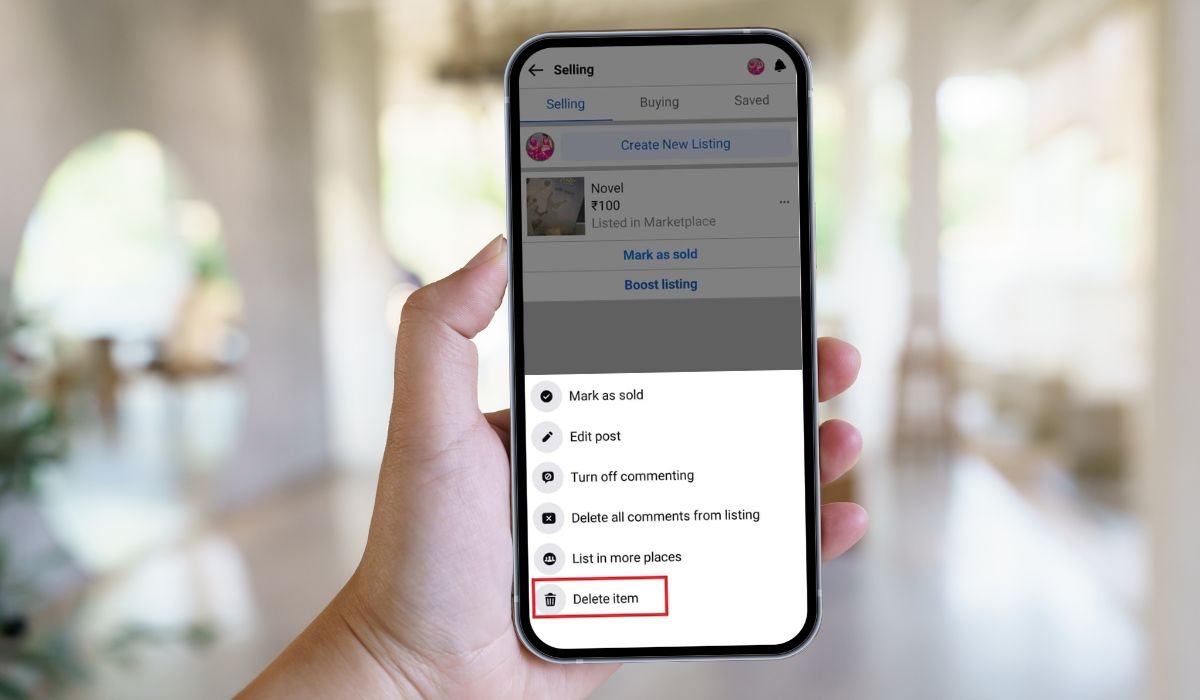
Pending listings on Facebook Marketplace can be a frustrating experience for sellers. When a listing gets stuck in pending status, it means your item isn’t visible to potential buyers, which can delay or even prevent a sale.
Managing and removing these pending listings is crucial for keeping your sales active and avoiding any unnecessary delays. It’s essential to ensure that your items are correctly listed and available to buyers as quickly as possible.
In this guide, the reader will learn how to identify pending listings, the steps to remove them, and tips to prevent listings from getting stuck in the future.
Key Takeaways
- Pending listings on Facebook Marketplace can delay sales, making it crucial to manage and remove them promptly.
- Ensure your listings are complete and compliant with Facebook’s guidelines to avoid them being held in pending status.
- Editing or removing pending listings is easy—just follow the steps to access, identify, and update or delete them.
- Regularly monitor your listings and maintain an active profile to prevent common issues and keep your Marketplace experience smooth.
Understanding Pending Listings on Facebook Marketplace
Pending listings on Facebook Marketplace are those that haven’t been approved or made live for others to see. These listings are temporarily held back from being visible while Facebook reviews them. This process is in place to ensure that all listings comply with Facebook’s policies and community standards.
Common reasons why a listing might be pending include:
- Review Process: Facebook automatically reviews listings to check for compliance with their guidelines. If the system flags something, the listing will stay pending until it’s manually reviewed.
- Community Standards: If your listing contains prohibited items, inappropriate content, or violates Facebook’s rules, it might be held in pending status.
- Incomplete Information: Listings that lack essential details like a clear description, price, or proper categorization may also remain pending until these issues are resolved.
Understanding these factors can help you avoid common pitfalls and ensure your listings go live without delay.
Can I Remove Pending Listings on Facebook Marketplace?
Yes, you can remove pending listings on Facebook Marketplace. To do this, locate the pending item in your listings, click on the dropdown menu, and choose to either edit the listing or delete it entirely. This action will either update the listing or remove it from pending status.
Steps to Remove Pending Listings
Step 1: Accessing Your Marketplace Account
To start, you’ll need to access your Facebook Marketplace account. Log in to your Facebook account and click on the “Marketplace” icon, usually found in the menu on the left side of your homepage. Once there, navigate to the “Your Listings” section. This is where you’ll find all the items you’ve posted for sale.
Step 2: Identifying the Pending Listings
In your listings, look for any items marked as “Pending.” These listings will typically have a label or a status indicator showing that they aren’t yet live. Pending listings may appear grayed out or have a note next to them indicating their status.
Step 3: Editing or Removing the Listing
Once you’ve identified a pending listing, you have two options: edit or remove it. If the listing is pending due to incomplete information or a mistake, click on “Edit” to update the necessary details. Make sure everything is filled out correctly, including the title, description, price, and category. After making your changes, save the listing, and it will be reviewed again.
If you decide that you no longer want to keep the listing, or if you’re unable to fix the issue, you can choose to remove the listing entirely. Simply click on “Delete” or “Remove,” and the listing will be taken down.
Step 4: Confirming the Removal
After you’ve edited or removed the listing, it’s important to confirm that the action was successful. Go back to your listings and check that the pending status has either changed to live or that the listing has been removed entirely. If the listing is still pending, you may need to wait a bit longer or contact Facebook support for further assistance.
Here’s a more concise table format for the steps:
| Step | Action |
|---|---|
| 1. Access Account | Log in and go to “Your Listings.” |
| 2. Identify Pending Listings | Look for items marked as “Pending.” |
| 3. Edit or Remove | Update info or delete the listing. |
| 4. Confirm Removal | Ensure pending status is resolved/deleted. |
Troubleshooting Common Issues
Pending Status Not Changing?
If your listing’s pending status isn’t changing after you’ve made edits or waited for a reasonable amount of time, don’t panic. There are a few steps you can take to resolve this issue. First, try refreshing the page or logging out and back into your account. Sometimes, a simple refresh can update the status.
If the status still doesn’t change, double-check your listing for any violations of Facebook’s community standards or missing information. Correct any issues and resubmit the listing. If everything seems correct and the status remains unchanged, consider contacting Facebook support for help. They can provide insight or manually review your listing.
Errors During Removal Process
Occasionally, you might encounter errors when trying to remove a pending listing. Common errors include a failure to delete the listing or an error message saying the action couldn’t be completed.
To resolve these issues, try the following:
- Clear your browser cache and cookies, then attempt the removal again.
- Switch to a different device or browser to see if the issue persists.
- If the problem continues, report the issue to Facebook through the help center. Provide as much detail as possible, including screenshots of the error message, to get the best support.
By troubleshooting these common issues, you can effectively manage and resolve problems with pending listings on Facebook Marketplace.
Best Practices for Avoiding Pending Listings
Tips on Posting
To avoid your listings getting stuck in pending status, it’s important to follow a few key practices. Start by providing clear and complete information in your listing. Make sure the title, description, and price are accurate and detailed. Avoid using overly vague language or leaving out essential details.
Another tip is to select the correct category for your item. Misclassified items are more likely to be flagged by Facebook’s review process. Additionally, use high-quality images that clearly show the product from multiple angles. This helps build trust with buyers and meets Facebook’s requirements.
Understanding Facebook’s Policies
Familiarizing yourself with Facebook’s Marketplace policies can significantly reduce the chances of your listings being held in pending status. Facebook prohibits the sale of certain items such as weapons, illegal drugs, and adult products. Posting these items can result in your listing being removed or your account being restricted.
Additionally, ensure that your listings adhere to community standards. This includes avoiding misleading information, spammy content, or anything that could be considered offensive. It’s also important to be transparent in your listings—avoid clickbait or deceptive tactics that might trigger a review.
By following these best practices, you can minimize the risk of your listings being flagged and ensure a smoother experience on Facebook Marketplace.
Conclusion
Removing pending listings on Facebook Marketplace is a straightforward process. Start by accessing your Marketplace account and navigating to your listings. Identify any that are pending, then choose to edit or remove them as needed. Finally, confirm the changes to ensure the listing has been updated or successfully deleted.
To keep your Marketplace experience smooth, it’s important to maintain an active and compliant profile. Regularly check your listings for any issues, and always ensure that your posts meet Facebook’s guidelines. Staying proactive can help you avoid the frustration of pending listings and keep your sales moving forward.
If you found this guide helpful, consider checking out other related guides on managing your Facebook Marketplace account. We also encourage readers to share their experiences or tips in the comments section—your insights could help others navigate similar challenges!
Frequently Asked Questions
Why is my Facebook Marketplace still pending?
Your listing might still be pending due to Facebook’s review process, incomplete information, or a violation of community standards. Double-check your listing and make necessary corrections to resolve the issue.
How do I change my pending status on Facebook?
To change a pending status, edit the listing with accurate information and resubmit it. If it remains pending, you may need to wait for Facebook to complete their review or contact support for assistance.
How do I delete Marketplace on Facebook?
You can’t delete the Marketplace feature itself, but you can remove your listings or stop using the platform. To delete a listing, navigate to your listings and choose “Delete” or “Remove.”
How do I delete a Facebook Marketplace listing?
Go to “Your Listings” in Facebook Marketplace, find the listing you want to delete, and click on “Delete” or “Remove.” This will take the listing down from the platform.
Why can’t I delete my Facebook Marketplace post?
If you can’t delete a Marketplace post, it might be due to a temporary issue or system glitch. Try clearing your cache, using a different browser, or contacting Facebook support.
How to clear FB Marketplace history?
To clear your Facebook Marketplace history, go to your “Recent Activity” on the Marketplace page and manually remove individual items. There isn’t an option to clear all history at once.


