

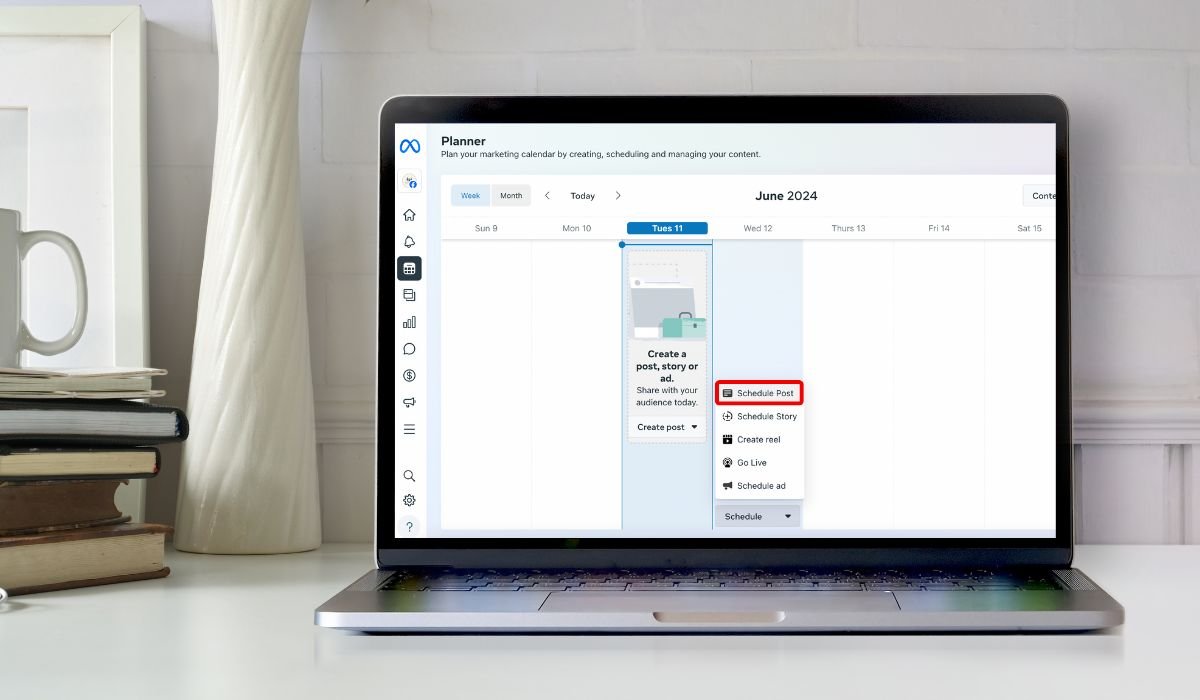
Scheduling shared posts on Facebook is a simple yet powerful tool. It helps maintain a consistent online presence without the need to post in real-time.
By scheduling posts, one can ensure that content reaches the audience at the optimal time. This is crucial for maximizing engagement and making the most out of each post.
Whether managing a business page or simply keeping friends updated, scheduling posts saves time. It also allows better planning and coordination of social media efforts.
In this guide, we’ll explore how to schedule shared posts on Facebook step by step, making it easy for anyone to get started.
Key Takeaways
- Scheduling posts on Facebook is a powerful way to maintain consistency and maximize engagement by posting at optimal times.
- Only Facebook pages, not personal profiles, can schedule posts directly through the platform’s native tools.
- Third-party tools like Hootsuite and Buffer offer more advanced scheduling options, including automation and multi-platform management.
- Always review and monitor scheduled posts to ensure quality and timely interaction with your audience.
Why Schedule Shared Posts on Facebook?
Consistency in Posting
Scheduling posts helps maintain a regular flow of content. This ensures your audience consistently receives updates, keeping them engaged and informed without overwhelming them.
Time Management
By planning posts ahead, you can save time and focus on other important tasks. Scheduling allows you to batch-create content, freeing up your schedule and reducing daily posting stress.
Maximize Engagement
Posts scheduled for peak times are more likely to reach a larger audience. This strategy leverages your audience’s active hours, increasing the chances of likes, comments, and shares.
Content Strategy
A well-planned schedule helps maintain a steady content stream, which is crucial for audience retention. It reduces the risk of spamming followers, ensuring that your posts are well-timed and thoughtfully spaced out.
Can You Schedule a Shared Post on facebook?
Yes, you can schedule a shared post on Facebook, but it’s primarily available for pages, not personal profiles. Simply share the post, select the “Schedule” option, choose your preferred date and time, and confirm. This allows you to plan your content in advance and reach your audience at the best times.
Prerequisites for Scheduling a Shared Post
Facebook Page vs. Personal Profile
Scheduling posts on Facebook is a feature primarily available for pages, not personal profiles. This means if you want to schedule a post, you need to be managing a Facebook page rather than just posting from a personal account.
Admin or Editor Role
To schedule posts on a Facebook page, you must have the right permissions. Only users with an Admin or Editor role can access the scheduling feature. If you don’t have these roles, you won’t be able to schedule posts.
Linked Social Media Tools
Sometimes, native scheduling tools might not meet all your needs. In such cases, third-party tools like Hootsuite, Buffer, or others can be useful. These tools allow more flexibility and control, especially if you’re managing multiple social media accounts.
Step-by-Step Guide to Scheduling a Shared Post on Facebook
Step 1: Navigate to Your Facebook Page
Start by opening Facebook and heading to the page where you want to schedule your post. If you’re managing multiple pages, ensure you’re on the correct one. You can do this by selecting the page from the left-hand menu on your home screen.
Step 2: Select the Post You Want to Share
Next, choose the post you’d like to share. This could be something from your own timeline, another page you follow, or even from a group. Make sure the content is relevant and valuable to your audience.
Step 3: Share the Post to Your Page
After selecting the post, click the “Share” button. This will open a new window where you can customize your post. You can add a caption, tag people, or change the visibility settings to control who sees your post.
Step 4: Click on the Scheduling Option
Before hitting “Share Now,” look for the dropdown arrow next to it. Click it, and you’ll see an option to “Schedule.” This feature allows you to set the exact time and date for your post to go live.
Step 5: Set the Date and Time
Choose the date and time that aligns best with when your audience is most active. This is key to maximizing engagement. If you’re unsure, consider using Facebook Insights to find out when your followers are online.
Step 6: Review and Schedule
Finally, double-check your post to ensure everything is correct. Review the content, caption, and settings. Once satisfied, click “Schedule,” and your post will be set to publish at the chosen time.
By following these steps, scheduling shared posts on Facebook becomes a breeze, allowing for better time management and increased reach.
Scheduling Posts Using Third-Party Tools
Overview of Popular Tools
When it comes to scheduling posts, third-party tools like Hootsuite, Buffer, and similar platforms offer more features and flexibility. These tools allow you to manage multiple social media accounts from one dashboard, schedule posts in advance, and even analyze performance metrics.
Step-by-Step Scheduling with Hootsuite
- Connect Your Facebook Account
Start by signing up for Hootsuite and linking your Facebook account. This integration allows you to manage and schedule posts directly from Hootsuite. - Select the Post, Set the Date and Time
Choose the content you want to share, then set the date and time for the post to go live. Hootsuite’s interface makes it easy to select the optimal time based on your audience’s activity. - Advantages of Using Hootsuite Over Facebook’s Native Scheduling Tool
Hootsuite offers several benefits, including the ability to schedule posts across multiple platforms, access to more detailed analytics, and team collaboration features. It’s a more robust solution if you’re managing a large or diverse social media presence.
Benefits and Drawbacks
While Facebook’s native scheduling tool is simple and directly integrated into the platform, third-party tools like Hootsuite provide more advanced features and greater flexibility. However, they may require a subscription and a learning curve. Native tools are free and easy to use but may lack the advanced options needed for more complex scheduling strategies.
Tips for Effective Post Scheduling
Know Your Audience
Understanding your audience’s behavior is crucial. Knowing when they are most active helps you schedule posts at times when they’re more likely to see and engage with your content.
Use Facebook Insights
Facebook provides built-in tools like Facebook Insights, which allow you to analyze when your followers are online. This data is invaluable for optimizing your post schedule to maximize reach and engagement.
Keep a Content Calendar
A content calendar helps you plan and organize your posts in advance. Maintaining a regular posting schedule ensures that your content is consistent and aligns with your overall strategy, making it easier to manage long-term.
Avoid Over-Scheduling
While regular posting is important, avoid the temptation to over-schedule. Posting too frequently can overwhelm your audience, leading to lower engagement or even unfollows. Find a balance that keeps your audience engaged without bombarding them with content.
Monitor Post Performance
Regularly check how your scheduled posts are performing. Monitoring performance allows you to adjust your strategy as needed, ensuring that your posts continue to resonate with your audience and achieve your desired outcomes.
Common Mistakes to Avoid
Ignoring Time Zones
When scheduling posts, it’s easy to forget that your audience may be spread across different time zones. Scheduling without considering these differences can result in posts going live when your key audience is inactive. Always take time zones into account to maximize engagement.
Overlooking Content Quality
In the rush to fill your content calendar, it’s tempting to prioritize quantity over quality. However, sacrificing content quality can harm your brand’s reputation. Ensure every post is valuable and relevant to your audience, even when scheduling in advance.
Not Engaging with Comments
Scheduling posts doesn’t mean you should set and forget. Failing to engage with comments and interactions can make your brand seem distant or unresponsive. Always monitor your scheduled posts and respond to audience engagement promptly.
Forget to Review Scheduled Posts
It’s crucial to double-check your posts before they go live. Forgetting to review scheduled posts can lead to mistakes or outdated content being published. Regularly review your scheduled queue to ensure everything is accurate and timely.
Conclusion
Scheduling shared posts on Facebook offers numerous benefits, from ensuring consistency in your content delivery to maximizing engagement by posting at optimal times. By planning posts ahead, you save time and maintain a steady presence on social media, all while avoiding the pitfalls of over-posting or neglecting quality.
These strategies are easy to implement and can significantly improve your social media management. Start scheduling your posts today to take control of your online presence and see better results from your efforts.
If you have any questions or thoughts, feel free to leave a comment below. We’re here to help you succeed in your social media journey!
Frequently Asked Questions
Can I schedule a shared Facebook post?
Yes, you can schedule a shared post on Facebook. To do this, copy the link of the post you want to share, create a new post using the Publishing Tools, and paste the link. Then, select “Schedule” from the drop-down menu to set your desired publish time.
How do I set a post to share at a certain time?
To set a post to share at a specific time, navigate to your Facebook page, create your post, and click the dropdown arrow next to “Share Now.” Select “Schedule,” then choose the desired date and time for the post to go live.
Can Facebook posts be scheduled?
Yes, Facebook posts can be scheduled, but this feature is only available for pages, not personal profiles. You can schedule posts directly from your page’s publishing tools or use third-party tools for more advanced scheduling options.
How to auto post on Facebook?
To auto post on Facebook, you can use third-party tools like Hootsuite or Buffer. These platforms allow you to schedule posts in advance, automating the process and ensuring your content is published at the optimal time.
How do I set a time to post a Facebook post?
To set a time for posting on Facebook, create your post on your page, click “Schedule,” then select the exact time and date for it to go live. This feature is found in the publishing tools of your Facebook page.
Is there a free way to automate Facebook posts?
Yes, Facebook’s native scheduling tool allows you to automate posts for free. Additionally, some third-party tools offer free plans with limited features, letting you schedule and automate posts without any cost.


